
You can define the attributes for any access points, buildings, cable spans, cable segments, ductbanks, poles, slack loops, splice points, and termination points that you add to your network.
Adding Map Object Attributes

- Right-click map object.
- Hover over map object name under Objects header.
- Select Attributes,
- Make changes in Attribute Editor window.
- Select Update button to save changes.
- Select Close Form button to close Attribute Editor window.
Adding a Work Order to Map Object Attributes
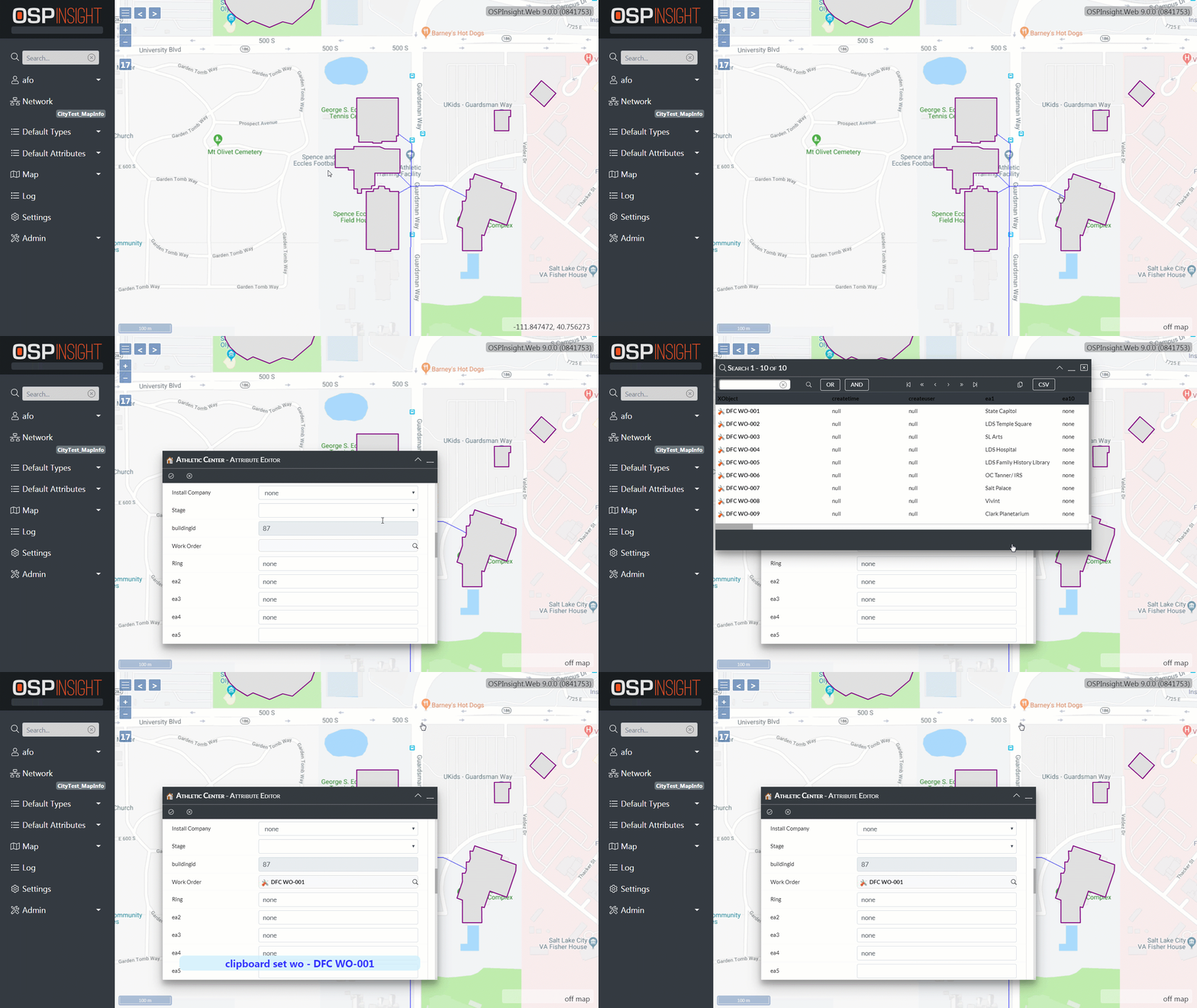
With the Attribute Editor window open:
- Find the Work Order attribute in the Attribute Editor window.
- Select the magnifying glass icon, on the Work Order attribute row, to open the Search window.
- Select a Work Order from the Search window.
- Select Work Order Copy button from the top toolbar.
- Verify that the selected Work Order populates the Work Order attribute.
- Select Update button to save changes.
- Select Close Form button to close Attribute Editor window.
Next Steps
You’ve covered Adding Map Object Attributes. Read on to learn more about:
Adding Cable Spans - Add cables to the map.
Spanlength Details - Edit cable spans and slack loop footage.